The RTT Device monitors string tension in real-time to enhance performance and help prevent injuries.
Installation
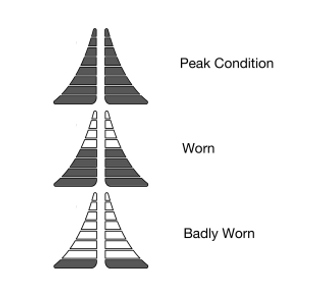
To install your RTT you can use the included screw driver to lever out the trap door in the butt cap of your racket. Your RTT should easily clip into the hole left by the the trap door. You can install your RTT at any time. You do not need to wait until you re-string the racket. Be aware however that if you install the RTT in a racket which already has worn strings then the string condition indicator will not be accurate until you re-string the racket.
Battery
The entire RTT display will go blank after several minutes of inactivity in order to save the battery. It will turn back on when it detects some movement. The battery indicator will come on when the charge level drops close to the level where it can no-longer power the RTT. If it is not re-charged then it will eventually go completely blank and will put itself into a deep sleep state. It can only be revived by charging.
The RTT can be re-charged using a standard USB-C charger. While the RTT is charging, the entire screen will flash and when charging is complete it will go blank.
For safety reasons, new RTT devices are shipped with very little charge in the battery and in a special low energy state. It can take up to 2 minutes of movement to wake up from this state. Shelf life in this state should be at least a year. Once an RTT device has been used, it will never return to the lowest energy state so wake up time is reduced to a few seconds. We recommend charging your RTT at least once every six months after this, even if the racket hasn’t been used otherwise the battery can become so depleted that it can no-longer hold a charge.